Q&Aコーナー
前提条件†
Windows XP Modeが使用可能であるエディションであること。(Professional、Enterprise、Ultimateのいずれか)
または、有効なWindowsXP、2000などのライセンスを所持していること
VirtualPCが動作可能であること
そのOSで動作するS-YXG50を所持していること
VirtualPC2007の動作用件†
- L2 キャッシュ付き 400 MHz 以上の (1 GHz を推奨) プロセッサを搭載した、x86 ベースまたは x64 ベースのコンピュータ。Virtual PC では、AMD Athlon および Duron、Intel Celeron、Intel Pentium II、Intel Pentium III、Intel Pentium 4、Intel Core Duo、および Intel Core2 Duo プロセッサの使用がサポートされています。Virtual PC は、マルチプロセッサ コンピュータで実行できますが、その場合も使用されるプロセッサは 1 個のみです。
- Super VGA (800 x 600) 以上の解像度のモニタを推奨。
- キーボードとマイクロソフト マウス、またはそれらの互換性のあるポインティング デバイス。
- ホスト オペレーティング システム : Windows Vista Business、Windows Vista Enterprise、Windows Vista Ultimate、Windows Server 2003 Standard Edition、Windows Server 2003 Standard x64 Edition、Windows XP Professional、または Windows XP Tablet PC Edition
Windows XP Modeの動作用件†
- サポートされているオペレーティング システム : Windows 7
- プロセッサ: ハードウェア支援による仮想化に対応した Intel®、AMD®、VIA® プロセッサ (BIOS で有効に設定)
- メモリ: 2 GB のメモリ (推奨)。
- ハード ディスク要件: Windows Virtual PC のインストール用に 20 MB のハード ディスク空き領域。
主なハードウェア支援による仮想化に対応したCPU†
| Atomプロセッサ | Supports Intel VT-x |
|---|
| Intel Atom Processor | 対応 |
|---|
| 230/330/N270/Z500/Z510/Z510PT/Z515 | × |
| Z520Z520PT/Z530/Z530P/Z540/Z550 | ○ |
| デスクトップ用プロセッサ | Supports Intel VT-x |
|---|
| Intel Celeron D Processor | 対応 |
|---|
310/315/315J/320/325/325J/326/330/330J/331/335/335J/336/340/340J/341/
345/345J/346/347/350/350J/351/352/355/356/360/365 | × |
| Intel Celeron Processor | 対応 |
|---|
220/
420/430/440/530/540/550/560/570/573/575/585/
900/
E1200/E1400/E1500 | × |
| E3200/E3300 | ○ |
| T1600/T3100 | × |
| Intel Core Duo Processor | 対応 |
|---|
| L2300/L2400/L2500 | ○ |
| T2050/T2300E/T2450 | × |
| T2250/T2300/T2400/T2500/T2600/T2700/U2400/U2500 | ○ |
| Intel Core i5 Processor | 対応 |
|---|
| i5-750 | ○ |
| Intel Core i7 Processor | 対応 |
|---|
| i7-860/i7-870/i7-920/i7-950 | ○ |
| Intel Core i7 Processor Extreme Edition | 対応 |
|---|
| i7-965/i7-975 | ○ |
| Intel Core Solo Processor | 対応 |
|---|
| T1300/T1400 | × |
| U1300/U1400/U1500 | ○ |
| Intel Core 2 Dou Desktop Processor | 対応 |
|---|
| E4300/E4400/E4500/E4600 | × |
| E6300/E6320/E6400/E6420/E6540/E6550/E6600/E6700/E6750/E6850 | ○ |
| E7200/E7300 | × |
| E7400 | SLB9Y:×
SLGQ8:×
SLGW3:○ |
| E7500 | SLB9Z:×
SLGTE:○ |
| E7600 | ○ |
| E8190 | × |
| E8200/E8300/E8400/E8500/E8600 | ○ |
| Intel Core 2 Extreme Desktop Processor | 対応 |
|---|
| QX6700/QX6800/QX6850/QX9650/QX9770/QX9775/X6800 | ○ |
| Intel Core 2 Quad Processor | 対応 |
|---|
| Q6600/Q6700 | ○ |
| Q8200/Q8200S | × |
| Q8300 | SLGUR:○
SLB5W:× |
Q8400/Q8400S/Q9000/
Q9100/Q9300/Q9400S/Q9450/Q9550/Q9550S/Q9650 | ○ |
| Intel Core 2 Solo Processor | 対応 |
|---|
| SU3300/SU3500/U2100/U2200 | ○ |
| Intel Pentium 4 Processor | 対応 |
|---|
518/532/538/548/552/520/521/530/531/540/541/550/551/560/561/571/
630/631/640/641/650/651/660/661/670 | × |
| 662/672 | ○ |
| Intel Pentium Desktop Processor | 対応 |
|---|
805/820/830/840/
915/925/935/945 | × |
920/930/940/950/960/
955/965 | ○ |
E2140/E2160/E2180/E2200/E2220/
E5200 | × |
| E5300 | SLB0U:×
SLGTL:○ |
| E5400 | SLB9V:×
SLGTK:○ |
| E6300/E6500 | ○ |
| Intel Xeon Processor | 対応 |
|---|
| ノート用プロセッサ | Supports Intel VT-x |
|---|
| Intel Celeron M Processor | 対応 |
|---|
310/320/330/340/350/353/360/370/373/380/383/390/
410/420/430/440/443/450/
520/523/530/
722/723 | × |
| Intel Celeron Mobile Processor | 対応 |
|---|
530/540/550/560/570/573/575/585/
900 | × |
| SU2300 | ○ |
T1600/T1700/
T3100 | × |
| Intel Core 2 Duo Mobile Processor | 対応 |
|---|
L7200/L7300/L7400/L7500/L7700/
P8400/P8600/P8700/P8800/
P9500/P9600/P9700/
SL9300/SL9380/SL9400/SL9600/
SP9300/SP9400/SP9600/
SU9300/SU9400/SU9600 | ○ |
| T5200/T5250/T5270/T5300/T5450/T5470/T5550/T5750/T5800 | × |
T5500/T5600/
T7100/T7200/T7250/T7300/T7400/T7500/T7600/T7700/T7800/
T8100/T8300
T9300/T9400/T9500/T9550/T9600/T9800/T9900/
U7500/U7600/U7700 | ○ |
| Intel Core 2 Extreme Mobile Processor | 対応 |
|---|
| QX9300 | ○ |
| X7800 | × |
X7900/
X9000/X9100 | ○ |
| Intel Pentium Mobile Processor | 対応 |
|---|
705/713/715/718/723/725/730/733/735/738/740/745/745A/
750/753/755/758/760/765/770/773/778/780 | × |
| T2060/T2080/T2130 | ○ |
| T3210/T2330 | × |
| Intel Core i7 Mobile Processor | 対応 |
|---|
| i7-720QM/i7-820QM | ○ |
| Intel Core i7 Processor Extreme Edition | 対応 |
|---|
| i7-920XM | ○ |
Windows XP Modeを使用する場合†
http://www.microsoft.com/downloads/details.aspx?familyid=B0DCFFEC-4EF5-4BC8-BEF1-C862D46A0F76&displaylang=ja
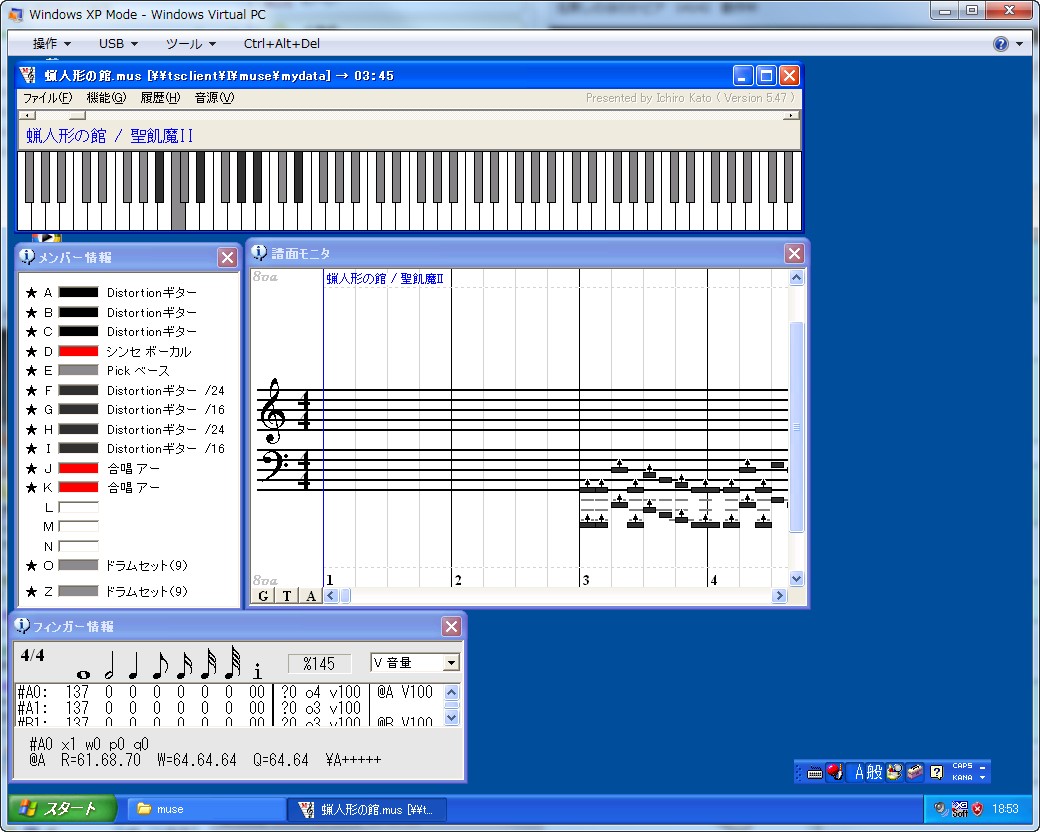
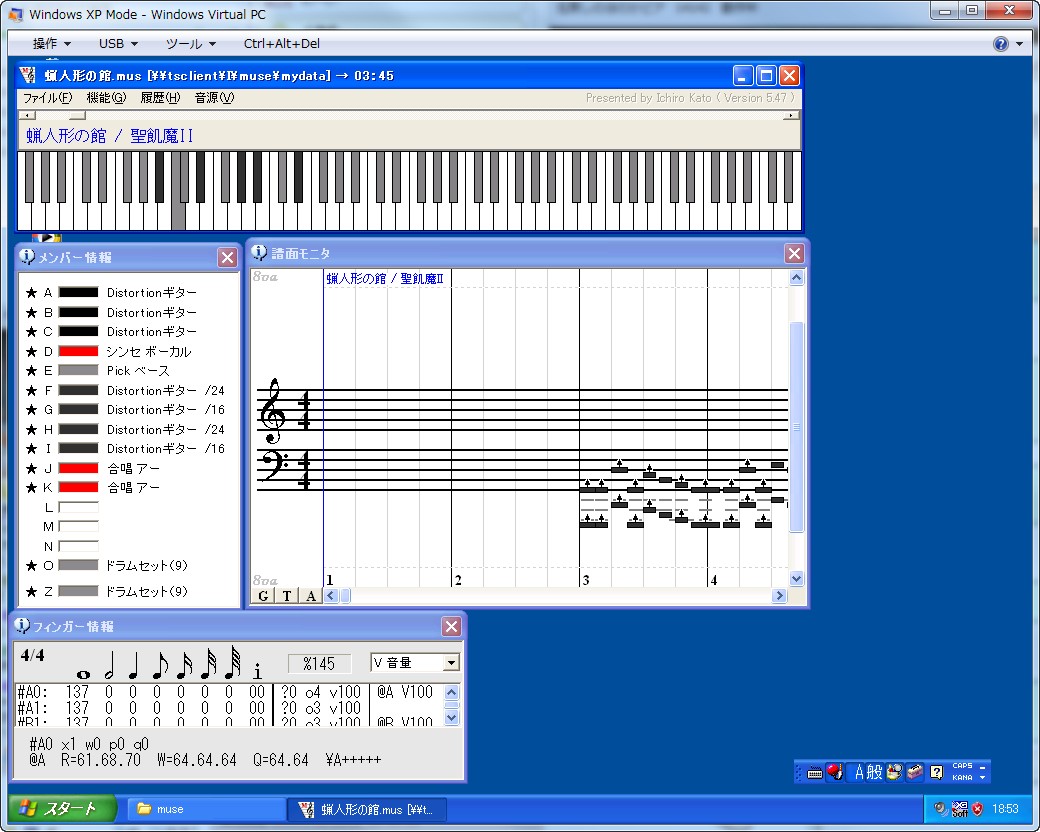
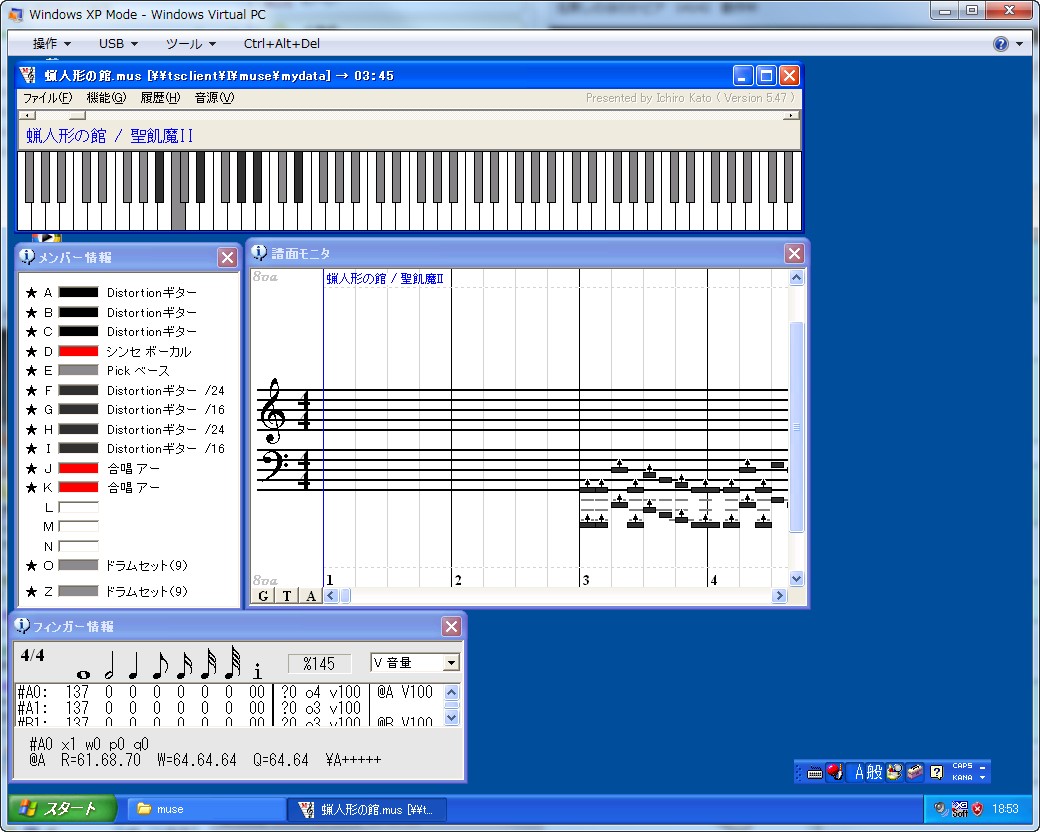
上記リソースノートを参考にWindows XP Modeをインストールする。
手持ちのS-YXG50をインストールする。
Museを起動→音源にS-YXG50を選択→演奏
その他の方法†
Vectorサイト内のWindows 7 アプリケーション動作報告リストにて、コマンドプロンプトを管理者として実行し「Hdwwiz.exe」を入力、デバイスの追加で動作したとのこと。
![[PukiWiki]](/MuseWiki/wiki_baner.png "[PukiWiki]")


 XPMode.jpg